Paint.NET just can’t satisfy an 8-core Opteron

Just to make sure, I went and downloaded the trial version of Windows Server 2008 from the Microsoft website. I installed it on this 8-core Opteron workstation with 8 GB of RAM that AMD sent me awhile ago for doing multithreading and performance scaling stuff. I installed version 3.22, then updated it to 3.30 Beta 2 to make sure that would work, and sure enough it does!
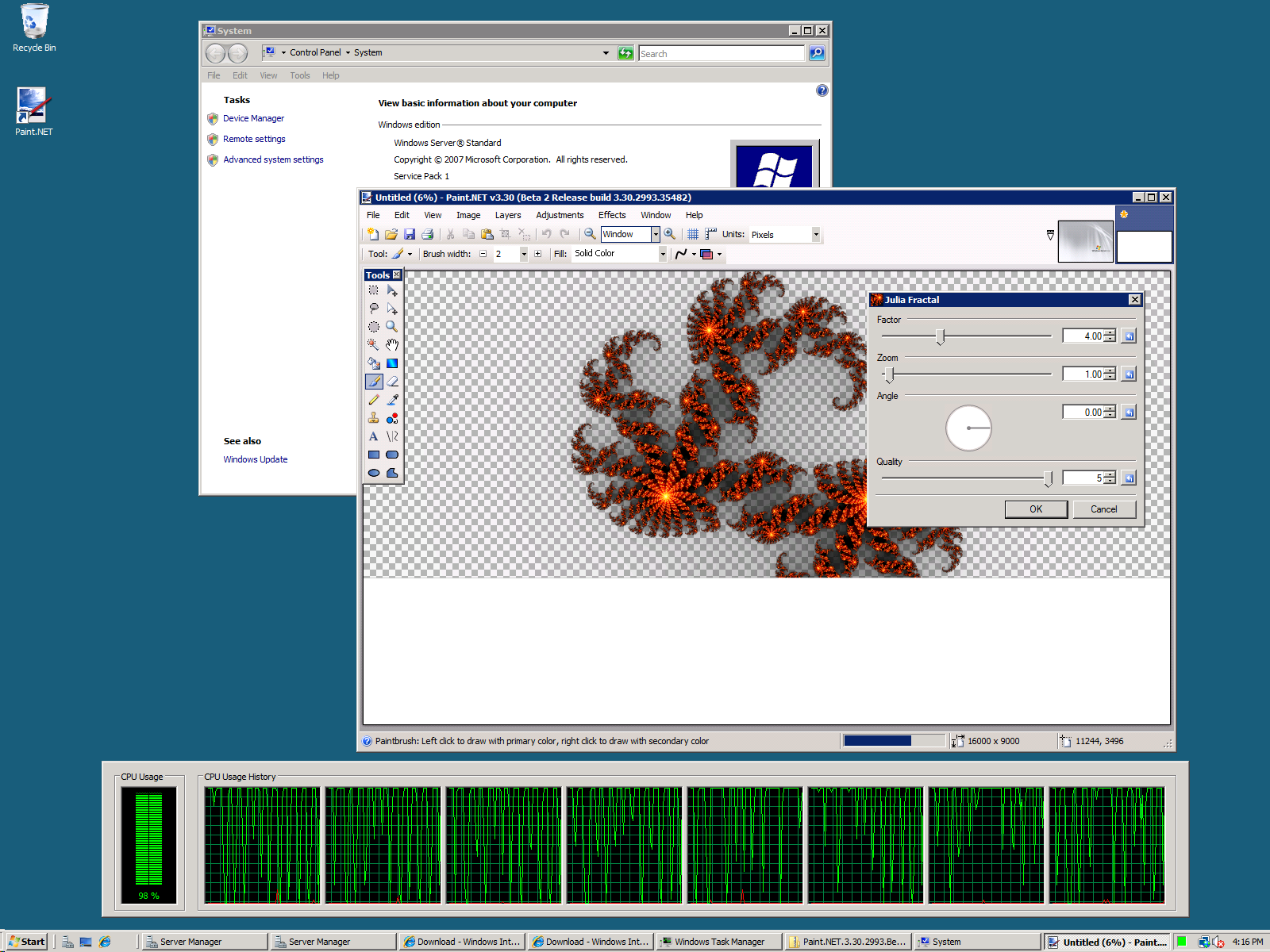

(click for full size, 1600×1200)

I’m not surprised, but I felt the need to verify this anyway 🙂 I’ll make sure the website lists Windows Server 2008 as a supported OS on the next update.

As an interesting side note, having access to systems with 4 and 8 cores has brought up an interesting performance problem in Paint.NET, and key insights for optimization and design going forward. In the past I have done a lot of work to ensure that certain key rendering code is multithreaded, and as such going from dual- to quad- to octa-core has yielded healthy performance gains. Even on these systems, quite often, I just can’t get CPU usage all the way up to 100%! Just look at the screenshot above: even on a very compute-intensive effect such as Julia Fractal, at highest quality, on a 16,000 x 9,000 pixel canvas (yes that’s 144 megapixels), the CPU usage is bouncing around and clearly not anywhere close to full performance. I guess the silver lining here is that power consumption is a little lower as a result, eh?

Even on my personal quad core desktop, I’m lucky if rendering a large gradient can hit 65% CPU usage. There’s a lot of wasted performance by having the rendering pipeline set up the way it us. Hopefully my talks with the .NET Parallels Extensions team will help me to improve this situation, while also putting some extra “real world” code in their laps to play with. With the current design, I wouldn’t be surprised if Paint.NET could barely keep a 64-core system more than 15% busy.

Also, I’d like to point out another exciting project related to things like concurrency and parallelism: Microsoft Live Labs Volta. I had a meeting with them last Tuesday and their approach to asynchronous, stream/event-based programming just blew my mind. Their project as a whole is actually targeted for some kind of simplified web cloud tier-distributed development*, but they have a concurrency runtime which could prove extremely valuable for the two rich client/desktop applications that I currently work on**. I’m very excited – anytime somebody sends me a meeting request titled, “Discuss monads and composition in the context of asynchronous computations,” I am reassured that there are still smart people out there working on cool things. I’m not sure how much I can discuss publicly about their stuff, but once I get any kind of green light I’m sure I’ll start gushing. I’ll leave you with one quote from the discussion that I actually made sure to write down, as it embodies something I’ve been struggling and searching for with respect to this type of coding:

“By construction, these things are correct.”

More on what that actually means later. I’ve got a lot of thoughts on parallel/asynchronous, concurrent, and functional programming and how it relates to multithreading, correctness, and performance. Hopefully I can put some of that into writing!

* This is not an exact definition 🙂
** That would be 1) Paint.NET, and 2) the other one that I work on at Microsoft (“my day job”).

Thoughts on Component Isolation for Paint.NET v4.0

I’ve been doing a lot of thinking about how Paint.NET needs to change or evolve before it hits version 4.0, and the big thing that keeps coming up is isolation. Right now, the control flow and error handling in Paint.NET lets one component crash or corrupt the whole program. This could be code sitting in a plugin that causes an unhandled exception in a way that my try/catch harnesses don’t handle, or it could be a COM component loaded by Windows common file Open/Save dialogs that crashes or locks up. Or maybe a piece of code doesn’t throw an exception but it does corrupt some other data, and then that corruption causes a crash later. And then that gets attributed to the wrong component. GDI+ seems to like doing that a lot.

Not only does Paint.NET need to be protected by crashing or "bad" plugins, but it needs to be protected from itself! Things like the Open/Save and Print dialogs are a good example, especially because they deal with external, "native" components. Some people have shell extensions installed that cause the Open/Save dialogs to fail, hang, or crash, and this breaks Paint.NET! This could be something as seemingly benign as a thumbnail provider for DivX videos. Yes, I get crash reports on the forum for that every so once in awhile. Why should Paint.NET have to crash if there’s a corrupted DivX video in a folder you’ve navigated to via File->Open? I’d rather crash just the Open dialog, detect the error without corruption in the main process, and then re-run the dialog in some kind of compatibility or reduced functionality mode. At least that way if it corrupts memory, then that corruption only affects the hosting process that it lives in.

So, there needs to be a really easy way for me to write a component in Paint.NET — whether it’s "built-in" or a "plug-in" — that can be isolated and not cause problems for the rest of the application. This means I want to host it in an external process and communicate with it, and then have a layer of abstraction in place for creating a "remote", isolated object.

The new System.AddIn namespace in .NET 3.5 provides a whole system for this, but honestly I find it to be way too complex, confusing, and involved. They have host views, add-in views, host-side adapter, add-in side adapters, etc. It’s a bunch of terminology that seems invented — why not just say client and server, proxy, tear-off, etc.? Every time you add a new interface or type you have to add code that spans at least 3 assemblies. Plus, they do not provide the ability for me to be running in a 64-bit process and have it communicate with an add-in that requires 32-bit hosting. This is important for certain plug-ins which are doing native interop to DLL’s that are only available in 32-bit (the VTF File Type Plugin comes to mind). They also do not provide the ability to activate an add-in that needs to run at a higher security level — for instance, if I want to require my Settings dialog to run with administrator privilege. I don’t want to have to deal with UAC at the code level, and would prefer it to be abstracted away. They also enforce a specific directory structure, and so on … anyway, it’s just too much and also too little.

.NET Remoting isn’t really an end-to-end solution for what I need, as it does not provide a hosting process. COM provides component hosting in an external process, but it seems like major overkill to register my .NET components as COM-proxied objects. Windows Communication Foundation is more for "enterprise" remoting and communication scenarios.

So it looks like I may have to roll my own solution, using System.IO.Pipes (actually I may prefer an HWND and WM_COPYDATA for marshaling) and borrowing heavily from the lessons put forth by System.AddIn (they have a very good story for versioning), and learned from my inbox full of crash logs. In any case it must be something that is easy to use by both the "host" and the "add-in" (or "built-in" :)). I’m thinking code generation will be very handy here in order to be able to declare an isolatable interface and then auto-generate the local tear-off/proxy, client stub, server stub, and registration glue.

Paint.NET forum is down … again :(

(D’oh — right before I hit "publish" on this post, the forums sprang back up)

I’m not sure what’s going on at Forumer lately, but it seems like the Paint.NET forums (not that the link works right now, mind you) have been up and down chaotically for the last few weeks. In fact, all of forumer.com is non-responsive, so I can’t even leave a troubleshooting ticket on their forum. This has been an ongoing problem lately, unfortunately. There was a time in January (if I remember right) where it was down for probably a full week. When this happens my inbox starts filling up with e-mails telling me about it and asking when things will be fixed. Unfortunately, it’s out of my control so there’s really nothing I can tell people.

I’ve actually been thinking about moving the forums for some time, so that I can host it myself. Problem is, the amount of time involved would be a lot, right? The thing would need a dedicated server and the ability to handle up to 200 users simultaneously (average right now is 30-50, so 200 gives room to grow). I wouldn’t be so worried about disk space (storage is practically free nowadays), but the CPU time needed would probably be high and keep increasing as more and more users joined. Then there’s the logistics of either migrating or deciding not to migrate things like the user database and content. Since Forumer has a policy of only giving you the database if they’re deleting your forum, it’d basically be a complete do-over.

The obvious benefits of self-hosting the forum are the ability to capture that incremental revenue boost by enabling AdSense and Kontera (maybe only for guest users though), and the ability to completely customize all forum elements. On the down side, I’d have full responsibility for the forum’s down time. I don’t know Unix very well so I’d probably run phpBB on a Windows server. Financially it makes sense, as the hosting costs would easily be covered by AdSense and Kontera. It’s the time thing that has kept me from pursuing this in the past. All this sporadic downtime is chipping away at my patience, however, and slowly changing my mind.

Anyway, thoughts on self-hosting the forum? (Please do not give me suggestions for other free forum host sites like Forumer, that’s not what I’m asking for.)

Cleaning up the UI for Paint.NET v3.30

While I was adding the color wheel control for IndirectUI, I decided that now was as good of a time as any to incorporate some other feedback from some of the more prominent plugin authors. Ed Harvey had suggested that the UI could be made more compact, as adding a bunch of properties often created a dialog that was large or spread out. BoltBait and pyrochild wanted the ability to change the text in the title of the dialog – perhaps to add a “version 2” tag or something similar. The rendering quality of the preview/thumbnail image in some of the dialogs was also a bit of a thorn in my side.

So, I’ve managed to address all of these, and a few others. The end result is a visually refreshed UI that is cleaner and less “noisy”. I think the difference is best seen by showing pyrochild’s Film effect plugin, before and after:

(Unfortunately I had to resize these to 65% of original size, otherwise my WordPress provider was complaining about the image sizes or something…)

At first glance it may not seem like much, but I think overall it results in a much more favorable user experience. The “tick marks” on the sliders are not shown by default (plugin authors may still enable them if they want though), and the dialog ends up being less spread out. The reset button is more subtle, favoring a small graphic instead of text. I may need to push it out another pixel or two so that it doesn’t accidentally get clicked instead of the up/down buttons. Or maybe I’ll move it to the left side of the text boxes. The thumbnail is also smoother, as it is using bicubic instead of bilinear resampling (although you can’t tell with the resized screenshots). For me, all this results in a less “noisy” dialog and it is much nicer to use.

And the great thing about IndirectUI is that all plugins written to use it will automatically get these benefits! 🙂 Hopefully this will help Paint.NET v3.30 further distance itself from being “a cowbell release“.

Nine Inch Nails and the New Online Business Model

As many people may already know, I am a big fan of the band Nine Inch Nails, aka NIN, which is basically Trent Reznor and whomever he hires to work and perform with him at any given time. Earlier in the week, Trent posted that a new album was available, titled “Ghosts I-IV” (volumes one through four). Not even “coming soon,” but available right now. Being a fan, I was naturally psyched about this and went to find out how I could get a copy right now.

Eventually I succumbed and bought the $300 super ultra deluxe edition that comes with four LP’s, two CD’s, one DVD, one Blu-Ray, an art book, ready-to-frame-and-hang art, and Trent’s signature. Plus it’s a limited edition with only 2500 copies. Hey, I need to use those Paint.NET donations for something, right?

The real story here is not that NIN has a new album, but rather in the way that it is being distributed. The music has been released under the Creative Commons Attribution Non-Commercial Share Alike license. Anyone who gets a copy of it has the freedom to make further copies and derivative works (e.g., remixes), as long as they give proper attribution and don’t make any money off of it. You can even download the album for free. They provide direct download links for 1/4th of the tracks, but with that license there’s nothing wrong with distributing or downloading the rest of the album if you find it elsewhere. Trent himself even uploaded those tracks to PirateBay* with a note saying:

“Undoubtedly you’ll be able to find the complete collection on the same torrent network you found this file, but if you’re interested in the release, we encourage you to check it out at ghosts.nin.com, where the complete Ghosts I-IV is available directly from us in a variety of DRM-free digital formats, including FLAC lossless, for only $5.”

Let’s take a step back though, first. The music industry is in a jam because 1) everyone is pirating music (PirateBay, LimeWire, BearShare, etc.), and 2) everyone hates DRM. Oh, and 3) all those lawsuits are making everybody hate them (the RIAA). The majority of people don’t care about paying for most of their music, but those who are willing to pay for it are getting punched in the face with the restrictions that DRM imposes. And even if you buy the CD, only a small percentage of what you pay actually reaches the artist who created the music in the first place. It’s really a lose-lose situation for everyone except the CEO’s of the record companies.

Recently, Trent announced that he is now free and independent of any record label contract, after fulfilling his obligation for a certain number of albums with the “Year Zero Remixed” disc. So, he can now do whatever the heck he wants to, business-wise. He has decided that he will take advantage of the freshly-crowned, most popular method for distributing music: rampant piracy! Except in this case it isn’t pirating because he’s intending people to distribute it this way. He’s getting new fans for free this way, and those fans will find other ways to send him money: concert tickets, t-shirts, and other “non-pirateable” goods. And without a record label as an intermediary, more of that cash goes into his pocket, which is exactly what we want!

It will be interesting to see how well this business model and experiment works out. The real test, however, will be whether this model will work for any other band, especially one that isn’t so widely known.

Also worth noting is that this is basically the business model that Paint.NET has been using for the last few years 🙂 Except that I do not [yet?] have any cool deluxe or limited editions for sale. Hmm, I wonder how much an autographed CD of Paint.NET would go for …

* “Uploaded these tracks to PirateBay” is actually a strong misnomer with the way BitTorrent technology works. But you get the idea.

Ask and you shall receive … Color Wheel for IndirectUI

As part of the version 3.30 release of Paint.NET, I have finally marked all of the code in PaintDotNet.exe as “internal” (instead of public). This code was supposed to be treated as internal implementation details of Paint.NET, but plugin authors were using the code anyway. So, at some point or another I was going to have to do this, and I chose version 3.30 as the ship vehicle.

(See, in Visual Studio 2003, which was the original development environment for Paint.NET, you couldn’t add an EXE as a reference. Then they added this capability in VS2005, but I didn’t catch on until later. So I had always assumed that plugins couldn’t access this stuff and so I didn’t need to mark it all as internal. Oops!)

Well, as it turns out, one of the most popular controls that was being used by plugins was the color wheel. You know, this thing:

This is causing many plugins to break, and I’ve been unmoving in allowing plugins to continue access it. However, KrisVDM on the forums had a reasonable request:

Rick, I don’t know if you followed the discussion on http://paintdotnet.forumer.com/viewtopic.php?f=16&t=22881 , but basically they’re begging and calling me names because I dropped the color wheel from the Drop Shadow UI.

I know I said so before, but I believe many effects and adjustments could benefit from a color wheel (or even two for my duotones) in the effect UI.

Would you please consider adding IndirectUI support for colors?

I told him I would look into it, and tonight I was able to crank out a control for this in about an hour:

It’s in private testing as we speak, and should have no trouble making it into the next beta update for v3.30. It should be a welcome addition for plugin authors.

Paint.NET learns Italian!

There’s one more feature, so to speak, that’s been able to sneak in to the v3.30 release. From the blog title it should be obvious: Paint.NET will soon be available in Italian!

I get a lot of e-mails asking for this, and now thanks to the hard working folks in Microsoft Developer Division ("DevDiv"), it will now be available. (DevDiv also handles the other 7 non-English translations)

"Just Add More Cowbell"

As an owner of a software project, one trap that’s easy to fall into is that of adding more and more features. Quite often these features do in fact add value, but there’s a certain point where adding features ends up being superfluous and actually has a negative impact. At that point, adding more features is akin to "more cowbell," as made famous by the Saturday Night Live skit with Christopher Walken and Will Ferrel. When it comes to deciding on the feature set for a new release, you should ask yourself: "Is this feature necessary? Or is it just more cowbell?"

With Paint.NET, I believe that I have, for the most part, avoided the trap of "more cowbell." However, it’s becoming more difficult. It is very easy for me to add new effects and adjustments and to then put out a new release which results in a spike of downloads, media attention, popularity, and of course … cash. Never underestimate the power that cash can have on the owner of a software project. If there’s no cash involved at all, then progress is slow and at one’s leisure. Too much cash and it becomes easy to fall into the trap of putting out "cowbell releases" because they’re easy. They make money. Apathy can then set in because, hey, rich people don’t have to care, right?

The work that needs to be done for Paint.NET v4.0 is, honestly, quite enormous and even intimidating. And while I’m working on it I need to have at least a trickle of releases using the v3.xx code base in order to keep public attention alive, and also to keep the money coming in. But, I don’t want to make any major changes in the v3.xx design or architecture because then that adds more stuff I have to rewrite or integrate in to v4.0. So, the natural thing to do is to add more effects or adjustments — because of the way these all use the same underlying hosting and execution system, I can literally add tons of these without adding extra work to v4.0.

However, doing this immediately puts Paint.NET into "cowbell territory". I was just thinking about the feature set I’ve made for v3.30, and I’m realizing that it’s teetering on the edge of this. The ability to save in new bit-depths with PNG is useful, but I’m also adding a big group of new effects that, honestly, I’m realizing mostly serve to make the release appear more feature-laden. In fact, I don’t think Vignette and Posterize are really that important, and so I think I’m going to cut them from this release. If you want them then you can download them in Ed Harvey’s plug-in pack from the forum.

So, as 2008 continues to progress, I’m still trying to figure out how best I can get more time to work on v4.0, while continuing a trickle of v3.xx updates, while also minimizing my engineering investment in it, while also avoiding turning those updates into "cowbell releases." One way that you can help is to point out when or if you think you see "cowbell" in Paint.NET!

Paint.NET v3.30 Preview

It’s time once again to start babbling about the next minor update to Paint.NET, which will be version 3.30. I’m planning to push it out the door in early April. Here’s what’s coming:

  • Integration of Ed Harvey’s Fragment, Vignette, and Posterize effects.
  • An enhanced version of the Polar Inversion effect, also written by Ed Harvey and originally included in his “Polar Inversion +” plugin.
  • PNG will now support saving in 8-bit and 24-bit. There is also an “auto-detect” option where Paint.NET will analyze the image and auto-select the lowest bit-depth that can save the image losslessly.
  • BMP will now support saving in 8-bit. It will also have the “auto-detect” option, but there is still no 32-bit BMP support. GDI+ just refuses to cooperate in allowing me to do that.
  • TGA will also support the “auto-detect” option, for its 24-bit and 32-bit support.
  • For developers, IndirectUI is now available for writing UI for file type codecs. There are also some extra property rules you can use, such as the ability to link values based on a checkbox (useful for linking R,G,B sliders for instance).
  • The usual round of bug fixes, including some memory corruption bugs I found after noticing that some effects were trying to access coordinates that couldn’t possibly exist. “NaN” is not a valid coordinate 🙂

After v3.30, I am planning two small updates after that: v3.32, and v3.34. These should include the usual round of bug fixes (there is always something to fix, even if it’s minor!), but also Ed Harvey’s “Surface Blur” and “Dents” effects. I will probably release v3.32 from 6 to 8 weeks after v3.30, and then v3.34 at 6 to 8 weeks after that. Hopefully this will give me a good chunk of time to devote to working on v4.0!