C# Extension Methods … Portability Aid?

In my first post about Paint.NET v4, I mentioned that I was learning a lot about C# 3.0 and .NET 3.5. One of the things I’m absolutely falling head-over-heels for is extension methods.

One use of these is to add utility functionality on to existing classes that you don’t own the implementation for. As an example, consider the System.Uri class. In my opinion, it could use an Append method:

public static class UriExtensions
{
    public static Uri Append(this Uri baseUri, string relativePath)
    {
        return new Uri(baseUri, relativePath);
    }
}

You can then use code such as this:

Uri donateUri = new Uri("http://www.getpaint.net").Append("/donate.html");

Instead of:

Uri donateUri = new Uri(new Uri("http://www.getpaint.net"), "/donate.html");

(Bear in mind that the string literals would probably be pulled out of a list of constants, and not inlined like in the code above.) In this case, we’re simply enabling a choice of coding style and not really doing anything new. We are avoiding pathological nesting such as "new Uri(new Uri(new Uri(…" for when we need to paste together multiple relative Uri paths.

One place I’m finding extensions methods to be very useful is in defining and implementing interfaces with only strictly orthogonal functionality. You don’t need to add utility methods to interfaces, you can simply define them as extension methods.

For example, my resource manager is contained in an IResourcesService interface that has GetString() and GetBinaryStream() methods. And that’s it.

using System.IO;

namespace PaintDotNet.Framework
{
    public interface IResourcesService
    {
        string GetString(string stringID);
        Stream GetBinaryStream(string streamID);
    }
}

All resources other than strings are stored as binary streams, such as icons, bitmaps, text files, etc. If you want to load a bitmap, then you can use the handy extension method:

using System.Drawing; // pull in GDI+

namespace PaintDotNet.WinForms
{
    public static class ResourcesServiceExtensions
    {
        public static Bitmap GetBitmap(this IResourcesService resources, string streamID)
        {
            return new Bitmap(resources.GetBinaryStream(streamID));
        }

        // similarly for GetIcon, GetCursor, etc.
    }
}

… elsewhere in the code …

menuItem.Image = Resources.GetBitmap("Icons.MenuFileExitIcon.png");
    // Resources is a local property that gets the IResourcesService assigned to us

I could have multiple implementations of IResourcesService. For example, I could have the "normal" implementation that pulls from the local file system, then a test version that does all sorts of fakery, and then maybe experiment with one that loads all my resources via HTTP GET. But, I only ever need one implementation of GetBitmap() because it is just a helper method sitting on top of GetBinaryStream().

But wait, there’s more!

GetBitmap() returns a reference to a System.Drawing.Bitmap object. You generally only care about this type if you’re writing a WinForms application (which I am doing). Or, put another way, you wouldn’t want an object of this type if you were writing a WPF application. You’d want a BitmapSource or something. I am not writing a WPF version of Paint.NET v4, but one of my goals is to have the ability to write one. This is where the "separation of UI and logic" comes into play from my previous post. I refer to the WinForms UI as the shell. The "business logic" portion of the code base is referred to as the application (app for short). You could potentially have a WPF shell, or a command-line shell. Or you could write your own UI toolkit that P/Invokes straight to the Win32 API and bypasses WinForms completely (I believe the latest Zune UI does this).

So, if we wanted a WPF shell for Paint.NET, we could still use the same interface and implementation for IResourcesService. No changes needed anywhere. Why should the resource loader care about what UI you’re using? Its job is to give you strings and binary streams. It’s your job to parse them. It shouldn’t need a reference to the likes of System.Drawing.dll or PresentationCore.dll.

Thus, we’d probably find the following extension method setup useful in our hypothetical WPF shell:

using System.Windows.Media.Imaging;
namespace PaintDotNet.Wpf
{
    public static class ResourcesServiceExtensions
    {
        public static BitmapSource GetBitmapSource(this IResourcesService resources, string streamID)
        {
            return …; // not sure what code goes here exactly 🙂
        }
    }
}

The WPF-based shell would never pull in the PaintDotNet.WinForms namespace, and would instead use the PaintDotNet.Wpf namespace. They’d almost certainly be in separate DLL’s. So these two static extension classes will never collide, even if they have similarly named methods.

Using extension methods this way is probably preferable to "interface inheritance" for adding utility methods. For example, now I don’t need to declare a IWinFormsResourceService that derives from IResourcesService. I can avoid putting all the utility functionality into the base interface which could cause headaches.

As another example of only implementing "strictly orthogonal functionality", consider the case of the System.Windows.Threading.Dispatcher class and its CheckAccesss() and VerifyAccess() methods. The latter basically calls the former and converts true/false into return/throw. It could be done as an extension method. In fact, I have my own IDispatcher interface in Paint.NET v4, and this is exactly what I do. For sections of my code that are P/Invoke heavy, I’ve found it useful to have a SizeOf() method attached to any struct, as opposed to calling Marshal.SizeOf(Type). Less keystrokes, and I think it improves readability.
Yet Another Poorly Done Business Proposal

I can’t make these things up, folks. I honestly feel that if someone really wants to do business with you, they’ll at least do more than 3 seconds of research and get your product’s name correct. It should be easy to figure out that the product hosted at http://www.getpaint.net/ is called Paint.NET, and not "Get Paint." The logo is only emblazoned at the top of every page…

Hello,

Our company, Firstlook, is currently seeking partners to distribute our latest software product, SearchInOneStep.com.

With 10 million active users of search software and a stellar record in the search industry, we feel we would be a great match with Get Paint.

Get Paint attracts a large number of downloads, with which our software could be easily bundled during install to provide an alternate steady source of risk free revenue  which goes directly to your bottom line.

We offer our bundling partners the option to be paid per download and would be open to any volume of downloads that your company could provide.

Please feel free to contact me at your earliest convenience if you are interested in monetizing your downloads with Search in One step.  I look forward to discussing this matter with you further.

Thank you,

Sanjay

Well, Sanjay, my product is not called "Get Paint". I went to the website and tried the "search in one step" and it’s garbage. All it does is syndicate a bunch of ads. There aren’t even any search results! So I told Sanjay that I would not be doing business with him.

As for everyone else, if you want a good search engine for Paint.NET stuff, might I recommend http://searchpaint.net instead? 🙂

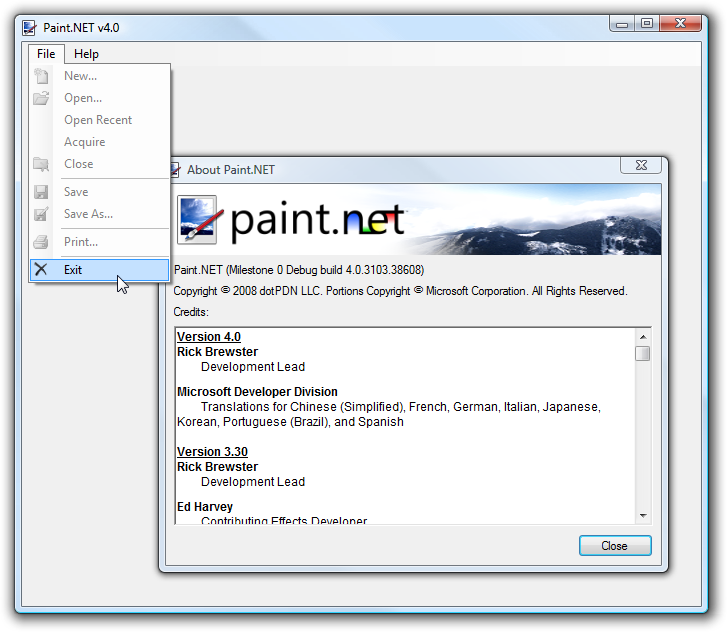
The very first Paint.NET v4.0 screenshot!

It’s really not as exciting as it sounds unfortunately 🙂 I’ve been quiet on the subject for some time, though, and wanted to put out some information.

For a long time I debated whether I should fully refactor Paint.NET, or do it from scratch. I finally decided on the latter, and have finally been able to make some progress. Bear in mind that "from scratch" means that I started with a brand new, empty solution file in Visual Studio. It does not mean I’m throwing out all the current Paint.NET code. There are many places where I will be able to reuse vast amounts of it — rendering kernels, effects, math, algorithms, etc. The entire structure of the program will be different, however. If you demolish your old house to build a new one, you don’t throw out the grand piano in the living room too. It still has plenty of value.

The screenshot above is from a build that so far contains about 12,000 lines of code. This sounds like an exorbitant amount for a few menus and an About dialog, but hear me out. I’m building it using Inversion-of-Control (IoC) and related patterns, which requires a lot of new decisions to be made regarding assembly layout (layering, essentially). I’ve also got a new system for asynchronous programming, separation of UI and logic, separation of "contract" and "implementation" assemblies (this becomes very important when plugins come into play), command routing and handling, etc. Along the way I’m learning more about .NET 3.5 and C# 3.0, and have come across some wickedly cool things that are now possible.

As far as possible, everything is lazy initialized or loaded in Paint.NET v4. To aid this, I have a new asynchronous programming model and exception handling pattern, which I could probably talk about for hours. For example, in the screenshot above, the icons for the menu items are not loaded until you click on the menu — in fact, they are loaded using background threads (the threadpool). The graphics and rich text that populate the About dialog are also loaded from the resource manager service using a background thread. For these specific cases, there are no major performance requirements that necessitate this; however, it’s much easier to solve these simple cases and to establish good patterns for later, than the reverse. I’ve also got an old Pentium 4 that I now have available for baseline performance testing, and it will be interesting to see if I can keep the program as responsive on that system as on my Core 2 Quad — even if rendering kernels take longer to complete, it should still always immediately respond to input. *crosses fingers* (Anyone else get sick of Safari on iPhone not being responsive while loading some web pages? Yeah.)

Also, in the screenshot you may notice that the mouse cursor is resting in the File menu even though the About dialog is open. In Paint.NET 3, all dialogs are modal and you can’t do anything with the rest of the program while one is open. In Paint.NET 4, I’m trying to remove this as much as possible and as far as it makes sense to. For example, why should an update download prevent you from using the rest of the program? Why can’t you switch from image 1 to image 2 while a compute-intensive (aka, "takes a long time") effect is rendering on image 1? Why can’t you interact with the canvas while an effect dialog is open? Or change the selected colors?

Anyway, that’s all for now. I estimate that Paint.NET v4 will be 200,000 lines-of-code when it is done, which places me at about 6% complete.

Software Developer Tip: RSS Aggregator + Google Blog Search

Large companies, such as Microsoft or Google, have entire sections of their company dedicated to things like PR (Public Relations) and paying attention to what the media says about them. As a small time individual developer, you probably don’t have time to track down everything that is said about your product. But, if you know how to use an RSS Aggregator such as RSS Bandit or Google Reader, then you can passively (efficiently) watch a lot of the buzz about your product.

The trick is to use the RSS syndication feature in Google Blog Search. Basically you do a search for your product’s name, and then you click on the button to get an RSS feed for that search query. Whenever you check in on your RSS feeds, you’ll know if people have been talking about your product in the “blogosphere.”

Step 1 — Go to Google Blog Search and type in your product’s name. Usually you want to surround it with quotes.

Step 2 — On the top right side inside the browser window, click on “Sort by date”. The default is to sort by relevance.

Step 3 — On the left side of the window, find where it says “Subscribe:” and then click on the format that you prefer (I use RSS, for instance).

Try it out 🙂 I use this to keep up on what people are saying about Paint.NET — both good and negative.

Paint.NET Help: Now with Windows Live Translator

One problem that a small software developer like myself faces is getting my software and its help content available to users that don’t speak my language. Translating something like the Paint.NET Help is a daunting task — it’s a lot of content, so it either takes a lot of time, or a lot of money.

Machine Translation (MT) gets a bad rep because it usually provides laughable, hardly usable translations. It is, however, very cost effective. So, I have added the Windows Live Translator widget to the Paint.NET Help. Hopefully it can help non-English users get the gist of the help content, while at the same time adding some more feedback into the Windows Live Translator system. Who knows, maybe someday it will be almost as good as a “real” translation 🙂

If you use this, then please send feedback via the “Is this translation useful?” link at the top of the Windows Live Translator shell.

PC Club stores close … I used to work there!

So, I just saw over at HardOCP that PC Club has shut down completely. We had around 4 of them in the Seattle area (Lynnwood, Bellevue, Tacoma, and I think one more), although only the Tacoma one was still around. I actually worked there as a “sales associate” in the summer of 2002, between my junior and senior years of college. I thought it was a pretty decent place to work, although apparently things went downhill after the founder passed away (whom I met — he gave me an eBay coffee mug which I still have).


PC Club in Lynnwood, WA, circa 2002

Some [possibly] interesting bits of historical info:

· I was the top grossing sales person there during the months that I worked (summer, and during Christmas break). However, my margins were lower than the others. The cause? I’m not sure, but it’s probably because I just told the truth, or at least my honest opinion, when customers asked questions! If someone was buying a computer and couldn’t decide between an Athlon XP or a Pentium 4, and asked “What’s the difference?”, then I replied with “You probably won’t notice much, other than the $100.” Because of this I sold more systems, albeit at less profit margin. I never sold one of the $1,000 Pentium 4 2.53 GHz chips … oh well 🙂
· When games like Morrowind or Unreal Tournament 2003 came out, we sold a lot of graphics cards. The big dog at the time was the GeForce 4 Ti4600, but we sold a lot of the Ti4400’s.
· The week before I started working there, the place was actually robbed. The manager was helping a customer with some questions at the front counter, and when he turned his back for a second the customer reached over and yanked a tray of expensive Pentium 4 CPU’s. Then he ran. If it hadn’t been for this, the store would have been profitable its very first month in operation.
· One time we had a very interesting fellow walk in carrying some computer almanac. He demanded to know how the computers responded to some math problem … apparently he thought that the Pentium FDIV bug was still around.
· The manager wanted us to try and sell the LCD monitors used by the POS (point of sale) computers. Even though they were obviously used and a little dingy (from fingers, post-it notes, etc.) he refused to sell them as anything but full price and new. “They aren’t used!” Umm, yes, they were! The customers he tried to sell them to weren’t exactly impressed (nor fooled).
· We had one guy come to the story regularly just to hang out and talk. He had a job as one of those guys who stands on the sidewalk wearing a sign that says, “Carpets For Sale!”, with a big arrow. He was a mostly normal guy, not a bother or anything … apparently they actually get paid good money to do that since it’s really hard to retain them.

Paint.NET turns 4!

According to the Roadmap page, version 1.0 was released four years ago on May 6th, 2004. Happy birthday Paint.NET!

As most people know, Paint.NET started as a senior design project at Washington State University‘s EECS department. When we finished the first version, it was meant as a “hey look we actually made something – neat!” project that we showed off to family and friends. A simple website was put up on the eecs.wsu.edu web server, and the project was neither hyped nor advertised once the semester was over. Fast forward a few months later, after I started working full time at Microsoft, and I was forwarded e-mail from some interns who had managed to find it and were asking about why it wouldn’t install on XP SP2.

Interesting things to know about the first version of Paint.NET, in no particular order:

· It took 15 weeks to complete, from start to finish.
· It was about 36,000 lines of code.
· It was distributed as a raw MSI, instead of an installer/wizard EXE.
· It required Windows XP SP1 as the minimum OS. There was no support for 2000.
· And, because of a typo, it did not work in Windows XP SP2! Changing an equals operator, =, to a greater-than-or-equals operator, >=, fixed this.
· Plugins were not supported.
· We used a CVS server that was running on an XP box that doubled as one of our development workstations. It was in the EECS computer lab that other people had access to, and we had to tape a piece of paper on to it that said, “SERVER – DO NOT TURN OFF!”
· We did not have a bug tracking system. We either fixed bugs immediately as we saw them, or put them in to an Excel spreadsheet (mostly the former).
· I made the floating windows translucent after observing that most people didn’t even try drawing in the occluded areas when I handed them a tablet PC with Paint.NET on it (“hey you, draw something!”). It was if that area of the canvas didn’t exist. Once the windows were made translucent, this went away! Usability studies really do work.
· For the first month or so of development, the status bar had no information in it. Instead, it had the text: “I am the status bar!!!!!!!!!1111”

Paint.NET merchandise store is now open!

I signed up for a Cafepress account awhile ago but never got around to adding merchandise to it. This weekend, I finally uploaded all the images and set up the products:

The Official Paint.NET Merchandise store: http://www.cafepress.com/paintdotnet/
Paint.NET Merchandise Store

There are shirts, a mouse pad, mugs, stickers, buttons, hats, and a tote bag. If you have feedback on the selection, either leave a comment or join the discussion on the forum here: http://paintdotnet.forumer.com/viewtopic.php?f=12&t=24051

Over the next week I’ll add links to the store added in other places, such as the main website. For now I’ve got the link here on the blog and on the forum. Cafepress doesn’t leave much room for profit, so this is mostly a promotional tool. Which means that if your intent is to send $20 to Paint.NET then we’re both better off if you donate directly. Purchasing a $19.99 shirt via Cafepress only nets me $1 or $2. If you want a shirt, then by all means buy one – but if you want to donate, then just donate 🙂

I’m not sure why I didn’t do this two years ago, it was rather easy to set up and the response so far has been very positive.

Validating .NET/RESX translations easily with LINQ-to-XML

One of the tools I finally decided to sit down and write was a "ResXCheck" utility. RESX files hold the string resources for many .NET programs, including Paint.NET. At build time, these are compiled into a binary format and then stored in a DLL, or a RESOURCES file (Paint.NET uses the latter). The binary format is simply more efficient to access at run-time, and resgen.exe can even be used to convert between the two formats.

Essentially, a RESX is an XML files with a big list of name/value pairs. I will refer to these as string names, and string values. The XML looks like this:

<data name="GradientTool.HelpText">
  <value>Click and drag to start drawing. Holding shift constrains the angle. Right mouse button reverses colors.</value>
</data>
<data name="GradientTool.HelpText.WhileAdjusting.Format">
  <value>Offset: {0}{1} x {2}{3}, Length: {4} {5}, Angle: {6}°. Holding other mouse button will move both nubs.</value>
</data>

The RESX files for translations are in the same format and should have all the same string names. The <value> elements should have different text in them however (it should be translated!). At runtime, both the translated and original RESOURCES files are needed — the latter is used as a "fallback" in case a string is not defined in the translation. Whether this is an error is up to your translation process and resource loader code. Sometimes you want that behavior, such as if you have the base "EN" (English) translation and then some strings must vary for "EN-US" (U.S. English) or "EN-GB" (British English). You can store common string definitions in "EN", although usually it is better to completely duplicate the content, and use a tool to maintain the duplication.

Having worked with RESX files on Paint.NET and elsewhere, the following problems come up:

  1. You could use the same string name twice. The RESX compiler will simply grab one of them, either the first or the last (I can’t remember). This is a problem if you go to update a string later and you change the wrong one. Then, your changes might not show up in the main program and you won’t know why. And you’ll have a heck of a time figure it out.
  2. A translation could be missing some string names. If this happens, generally the fallback text (usually English) will show up. That is probably not the desired behavior, although in Paint.NET there are a few places where it’s okay. Translating a technical acronym for a pixel format, such as "A8R8B8G8", isn’t really necessary.
  3. A translation could have extra string names defined. This is likely to happen if strings are removed from the original RESX, but the translation hasn’t been updated yet. This will not cause any errors, it is just extra cruft that can accumulate if you don’t pay attention (most professional translation teams have tools which handle this case automatically).
  4. A string value could have "malformed" formatting tags. In the XML listed above, the second text has formatting tags such as {0} through {6}. These represent values which must be supplied at runtime by the application. There are two hazards here. One is that you could have formatting that String.Format(…) doesn’t like, such as having a { without a closing }, or vice versa. The other hazard is if a translation defines extra formatting tags, such as if a {7} was added above. Then your application will crash when it goes to apply formatting to that string. This is mostly a problem when strings have not yet been updated for a newer version. The translation may define fewer formatting tags, and this may or may not be an error. You may have a formatting tag that represents a piece of text that is not necessary to display in a particular translation.

Luckily, all of these can be checked for with some simple automation, which is what I have done with ResXCheck. I will be including its code in the next Paint.NET source code drop (for v3.30), and plan to tag it as "public domain" (just the utility, not Paint.NET itself). In the mean time, here’s a little utility function that can help you load a RESX and convert it to an IEnumerable of type KeyValuePair<string, string> (duplicate string names are not removed — this is important for being able to check #1 above).

using System;
using System.Collections.Generic;
using System.Linq;
using System.Xml.Linq;
using System.Xml.XPath;

// Given a file name for a RESX, returns a non-consolidated list of string name/value pairs.
IEnumerable<KeyValuePair<string, string>> FromResX(string resxFileName)
{
    XDocument xDoc = XDocument.Load(resxFileName);

    var query = from xe in xDoc.XPathSelectElements("/root/data")
                let attributes = xe.Attributes()
                let name = (from attribute in attributes
                            where attribute.Name.LocalName == "name"
                            select attribute.Value)
                let elements = xe.Elements()
                let value = (from element in elements
                             where element.Name.LocalName == "value"
                             select element.Value)
                select new KeyValuePair<string, string>(name.First(), value.First());

    return query;
}

To check for duplicates, a simple query such as the following is all that’s needed:

var resx = FromResX("strings.resx");

var dupeItems = resx.ToLookup(kv => kv.Key, kv => kv.Pair)      // 1
                    .Where(item => item.Take(2).Count() > 1)    // 2
                    .SelectMany(item => item.Select(val =>      // 3
                    &
#160;   
new KeyValuePair<string, string>(item.Key, val.Value));

// 1 — converts from KeyValuePair<string, string>[] to IEnumerable<IGrouping<string, string>> — essentially a list of keys, each of which has a nested list of values
// 2 — finds any key which has 2 or more values in it. the "Take(2)" is an optimization
// 3 — convert back to a list of key,value pairs (probably not necessary if you use the "T-SQL" style syntax)

You can then do a foreach() over this virtual list and print out the key,value pairs. I could have written that query using the more succinct "T-SQL" style query syntax, but I hadn’t yet learned it when I wrote that part of the code. ResXCheck was a little project I took on to force myself to learn more about LINQ. Surprisingly, it only took about 2 minutes to learn the more compact query syntax.

I’m quite happy with LINQ. It’s letting me do some powerful data manipulation with very succinct, expressive code. And it’s very simple! I’ve already found a few mistakes in my RESX files, and they will be easy to fix. This tool will also help volunteer translators who publish their translations on the forum. I know it is hard to validate these things for correctness sometimes, especially for problem #4 list above.

Oh and for fun I made the utility parallelize the processing so you can validate "N" number of translations at the same time. Sadly, on my quad-core box it only dropped the validation time from 560 milliseconds down to 300. If I only have 50 more translations, then I could really stress it! 🙂

A simple C# / LINQ trick shown with Console.ReadLine()

I haven’t been working on Paint.NET v4.0 at all lately, but I have been reading, learning, and prototyping about a whole sleuth of things related to functional and asynchronous programming. One such topic is that of monads, which I have a blog entry almost completed on. However, I wanted to get a quick blog post to show something simple yet powerful. LINQ brings a lot of power to IEnumerable<T>, and in this case we’re going to map the console input into an IEnumerable<T>. Then we’ll use standard LINQ methods to only display those lines of text that have ".dll" in them. It’s a contrived example, but it’s easy enough to find more useful applications of this. I have to go in a minute, so I’ll throw this code up on the blog and let the conversation be driven from the comments.

public static class Extensions
{
    public static IEnumerable<T> ToList<T>(this Func<T> sampleFn)
    {
        while (true)
        {
            T val = sampleFn();
            yield val;
        }
    }

    public static IEnumerable<T> While<T>(this IEnumerable<T> list, Func<T, bool> whileFn)
    {
        foreach (T item in list)
        {
            if (whileFn(item))
                yield return item;
            else
                yield break;
        }
    }

    public static void Execute<T>(this IEnumerable<T> list)
    {
        foreach (T item in list) { }
    }

    public static IEnumerable<T> Do<T>(this IEnumerable<T> list, Action<T> action)
    {
        foreach (T item in list)
        {
            action(item);
            yield item;
        }
    }
}

class Program
{
    public static void Main()
    {
        Func<string> inputSampleFn = Console.ReadLine;

        var input = inputSampleFn.ToList()
                                 .While(s => s != null);

        var query = input.Select(s => s.ToLower())
                         .Where(s => s.Contains(".dll"));

        query.Do(s => Console.WriteLine(s))
             .Execute();
    }
}

Now, compile this to something like "dllFilter.exe". Then run, at the command line, "dir c:\windows | filter.exe". Neat 🙂