How to: Target .NET 4.0 Client Profile with C++/CLI

While porting Paint.NET v3.5.5 to .NET 4, I naturally ran head-first into the problem of making sure my two C++/CLI assemblies were targeting the client profile and not requiring the full framework. The problem here is that Visual Studio 2010 does not have a UI for setting a C++/CLI assembly’s target framework version and profile.

On MSDN, I found that someone had added a note on how to target a non-v4 version of the framework by editing or adding a <TargetFrameworkVersion> element to the VCXPROJ file. Once I saw this, I looked as the CSPROJ files for my other assemblies to see how they did it, and they were using the same element with the same value in the same location. They also used an additional element to specify which profile (Client or Full) was targeted. On a whim, I decided to guess and check to see if this same element was honored by the C++/CLI compiler, and it is!

So here we go: (this is modified from the text already at the page linked to above)

To change the version and profile of the .NET Framework for C++/CLI projects (VS 2010)

1. Right click on project in Solution Explorer and click Unload project
2. Right click on unloaded project in Solution Explorer and select Edit <projectname>.vcxproj
3. In project XML file locate node <PropertyGroup Label=”Globals”>
4. In that node locate node <TargetFrameworkVersion> (if the node cannot be found, add it)
5. Inner text of the node defines target framework. It can be v2.0,v3.0, v3.5 or v4.0
6. In that node locate node <TargetFrameworkProfile> (if the node cannot be found, add it)
7. Inner text of the node defines the target framework profile. For the Client profile, set it to Client (for Full, just omit the element)
8. Save vcxproj file and close it
9. Right click on unloaded project in Solution Explorer and click Reload Project

Example:

<PropertyGroup Label="Globals">     
    …       
    <TargetFrameworkVersion>v4.0</TargetFrameworkVersion>      
    <TargetFrameworkProfile>Client</TargetFrameworkProfile>      
</PropertyGroup>

Paint.NET v3.5.5 Beta … now with .NET v4!

Edit: Updated forum link. Also, this build is now available via the built-in auto-updater!

Visual Studio 2010 and .NET v4 are out! As usual, Scott Hanselman has some good coverage on this so I won’t repeat what he’s already published.

Anyway. Back in January, I announced that Paint.NET would be removing support for XP SP2 and Vista RTM “later this year.” Well, that time has come! From now on, Paint.NET will require XP SP3 or Vista SP1 (or Windows 7 of course). This is a result of migrating to .NET v4. I’ve spent the last few hours upgrading Paint.NET v3.5.5 to Visual Studio 2010 and .NET v4, along with a small army of fixes and changes that come with any big upgrade like this.

So, if you’d like to try out the first version of Paint.NET ported to use the brand spankin’ new .NET v4 …

… then head over to the forum and download it!
Please note that there are no .NET v4 specific changes or upgrades to Paint.NET. None. Please don’t ask me if it’s using System.Threading.Tasks, or Windows Workflow, etc. The answer’s no 🙂 Paint.NET will of course benefit from all of the regular optimizations that are in .NET v4, and this is also serving to pave the road for Paint.NET v4 to have a more seamless upgrade path. It also helps to unify my development setup so that I won’t need two copies of Visual Studio installed. Lastly, it helps to avoid a lot of confusion since otherwise installing .NET v4 would not enable you to install Paint.NET v3.5.4; it would still bark at you to install .NET 3.5 SP1. This is due to .NET’s side-by-side versioning system (which is actually a very good thing).

March 2010 usage statistics

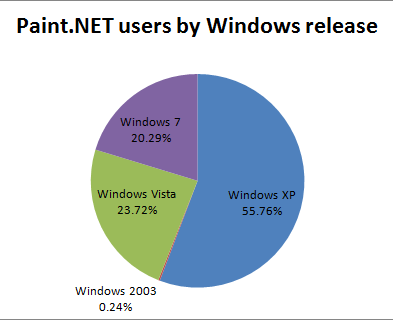
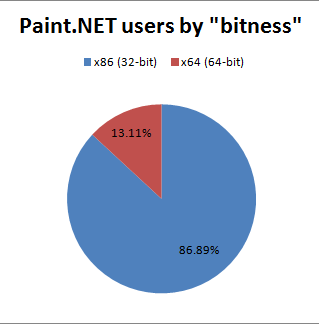
Here we go again! Last month I published some great numbers showing big gains in the areas of Windows 7, 64-bit, and Russian. This month there really isn’t much to report. Paint.NET usage is up a little, by about 4.3%. Windows 7 has cracked the 20% mark but that isn’t much of a jump since last month. Vista and XP have dropped a little, and 64-bit is showing a small gain (+6.7%). All in all a pretty quiet month, but things are still going in the right direction. (Please upgrade to Windows 7!)

Coding work on Paint.NET v4.0 has been progressing steadily, with a lot of progress being made on what you could call technology upgrades. More importantly I’ve made it past some important decisions. XP support is out so that I can focus on Win7/Vista and use Direct2D, DirectWrite, and the latest WIC (Windows Imaging Component) improvements. I’m hoping to implement a ribbon, although I’m still not entirely sure how to approach MDI with it. I think the current tabs+thumbnails approach works very well, but it may conflict with the official Ribbon UI licensing requirements. The canvas area will be hardware accelerated as much as is possible, and I’m also planning to pull in a docking panels system for the tool windows. Honestly, the transparent floaty windows thing was a neat idea but is starting to show its age, and it doesn’t work well at all on netbooks (1024×600 is a common resolution), or for a non-maximized window. The result is a very cramped UI for many situations. The library I’ve chosen to handle this works very similarly to Visual Studio, and has a lot of happy users already.

Here are some ugly pie charts:

And lastly, here are the raw numbers. Please note that “hits” refers to update manifest text files, not web site traffic in a browser. They are the result of an installation of Paint.NET being active and checking to see what the latest version is. Paint.NET doesn’t check for updates unless it’s open (no TSR’s), and it checks every 5 days at most (longer if it hasn’t been opened in more than 5 days, of course). Thus, these numbers are closer to indicating usage of Paint.NET as opposed to the raw, installed base of users.

February 2010 March 2010
Total update manifest hits 3,922,732 4,528,824
Hits per day 140,097 146,091
32-bit 87.72% 86.89%
64-bit 12.28% 13.11%
Windows XP 56.43% 55.76%
Windows 2003 0.24% 0.24%
Windows Vista / 2008 25.02% 23.72%
Windows 7 / 2008 R2 18.31% 20.29%
English 38.86% 38.85%
non-English 61.14% 61.15%
German 15.34% 14.68%
French 7.76% 7.79%
Portuguese 4.85% 5.20%
Spanish 5.90% 6.02%
Japanese 2.24% 2.24%
Italian 3.56% 3.57%
Polish 1.54% 1.51%
Netherlands (Dutch) 1.37% 1.35%
Russian 9.48% 9.79%
Chinese (Simplified) 0.67% 0.75%
Chinese (Traditional) 0.46% 0.55%
Turkish 3.68% 3.49%
Korean 0.31% 0.35%
All other languages 0.93% 0.81%
Have translations 79.48% 79.45%
Don’t have translations 20.52% 20.55%

Bold indicates that Paint.NET ships with the translation. Korean had a translation in v3.36, but not in v3.5+. For Russian, the reverse is true.

The Paint.NET forum has moved! Yay!

image When I mentioned that the forums were down for most of last week, I also promised it’d be worth it: we have finally moved the forum so that it’s sitting on our own hosting and not on freebie hosting. We’ve also migrated to IPB from phpBB, and will be adding and enabling more great features over the coming days and weeks.

Sorry to keep everyone in the dark, but we had to keep everyone in the dark, including our old freebie forum hosting provider.

The new address is http://forums.getpaint.net/

As with any large exodus or migration, there will be some glitches. For instance, apparently everybody on the forum was born on January 1st, 1970 🙂

Over time I’ll try to make sure all the links on this blog are pointing at the new location.

One nice thing about a big leap like this is that we can shed some dead weight. I just deleted over 16,000 accounts which had zero posts: that’s more than half the entire list of users!

Direct2D and WinForms: It Just Works

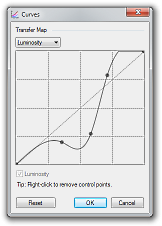
About a month ago I ported the Curves adjustment UI to use Direct2D for the transfer map (the interactive spline/grid). This meant that a rectangular portion of the form was carved out for Direct2D. If you’ve used WPF interop then you’ll be familiar with “airspace limitations”, and I was curious as to whether it would be possible to put a WinForms button on top of an area that is being rendered to with Direct2D. In other words, if you use Direct2D to render to an area of a Form, does it completely take over that rectangular area?

image 

Now, you can always take a guess, “Well of course you could/couldn’t do that because of explanation involving logical deduction or other example setting precedent.” For engineering purposes, however, something like this must be shown to work before taking a dependency on it.

And what do you know, it does work:

image

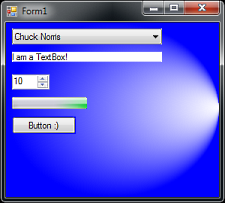
This screenshot shows a Form that contains a single control of type “D2DThingy.” That control then has 5 children controls of various types, and they are all stock WinForms controls. Clearly, they are able to coexist peacefully and without artifacts like clipping or flickering. Like with any WinForms UI there is still a lot of work to make sure that the background of the Button matches up with what’s behind it, etc. but that is a known problem with known solutions.

This is of special importance to me because I want to write a new toolbar UI for Paint.NET v4.0. However, I absolutely do not want to write my own ComboBox or TextBox controls. I could spend a full 12 months on a globalized TextBox that can work with all languages, input types, etc. Thankfully I won’t have to.

Try out Paint.NET v3.5.5 Beta

The forum has been down for most of this week. So, to reward (?) everyone’s patience and understanding I have posted a public beta for Paint.NET v3.5.5 which I blogged about earlier. Things will be back up soon, and I promise it will be worth the wait.

This isn’t available via the built-in updater, and the installer isn’t even digitally signed. It’s a beta and has not been fully tested, so all the usual warnings and scare tactics apply. I’d really like to get everyone’s feedback on the performance improvements 🙂 If they all work out then I’ll make sure more of them get into future releases.

What’s new:

  • Fixed the bug where saving as 8-bit PNG/GIF/BMP wasn’t always working. This often happened when “Auto” bit-depth was selected, and based on the color complexity of the image it would choose 8-bit (for a smaller file-size) and then fail with “error”. Usually this only happened with larger images. This was discussed here on the forum at http://paintdotnet.forumer.com/viewtopic.php?f=10&t=33944.
  • Improved performance of Gaussian Blur by 30-40% depending on your CPU (Intel Core i7 seems to show the best improvement).
  • Improved performance of all the layer blend modes by 15-30%, depending on your CPU (Intel Atom seems to show the best improvement).
  • Improved performance of zooming with the mouse wheel on dual-core Intel Atom systems.

The download link is over at the forum.

Also, do note that while I say that either of those two Intel chips (i7 or Atom) shows the best improvement, please keep in mind that I haven’t yet benchmarked on any other CPUs (Core 2, Phenom, etc.). I just picked up the new Intel Core i7-980X and it screams (especially at 4 GHz!). Paint.NET is faster than ever, and thankfully so are my build times for Paint.NET v4.0.

What's coming in Paint.NET v3.5.5: Performance!

There won’t be any new features this time around, of course, since it’s just a +0.0.1 release. There’s only 1 bug that I’ve found which I’ve decided to fix, which has to do with saving “large” 8-bit PNG/GIF/BMP images and is detailed over on the forum (summary: I was using 32-bit integer accumulators and they were overflowing; switching to 64-bit accumulators fixed it). Any plugin that makes use of the built-in quantization code will also be fixed.

So I’ve decided to add some more value to this release in the way of performance optimizations. The first optimization affects an admittedly small population of users: those who have Intel Atom-based nettops. The Intel Atom D510 and 330 chips are dual-core CPUs with HyperThreading and so they show up in Task Manager as 4 CPUs. Normally Paint.NET always uses multisampling to render the canvas. However, if the system has less than 4 CPUs it will use nearest neighbor while doing a zoom in/out with the mouse wheel. Since the Atom reports 4 cores, it was not benefitting from this, but it is now noticably zippier.

The second optimization is for everyone. One thing I’ve been wanting to do for awhile is to move some of the rendering kernels into C/C++ land. The reason for this is that the Visual C++ compiler can do a lot better static optimization than either the .NET JITter or NGEN.

With just a few hours of work today, I’ve managed to make Gaussian Blur about 42% faster. I’ve also applied this trick to the Normal, Multiply, and Overlay blend modes and am getting 15-20% faster performance. The “code” is almost exactly the same except with “uint” swapped for “unsigned __int32”, some marshalling logic, P/Invoke glue, etc. The bang-to-buck ratio here is great.

And of course, your mileage may vary (YMMV). These benchmarks were done on a quad-core Intel Core i7 at 4GHz running 64-bit Windows 7. I also ran them on my dual-core Atom 330, and the improvement was 35% for Gaussian Blur, and 30+% for the blend modes.

With v3.5.5 I will probably limit these optimizations to a few select areas in order to “test the waters.” If stability is good, as determined by the stream of crash logs I get (or don’t!), then I’ll bravely expand to other areas. I expect to release v3.5.5 by the middle of April.

Oh, yeah. On the Paint.NET v4.0 front, the decision has been made: it will require Win7/Vista minimum. I’ve already got most of the interop layer for Direct2D, DirectWrite, and Windows Imaging Component (WIC) written. The first feature to use these was a replacement of “my” super sampling code for WIC’s “Fant” resampling. This means that the quality of Image->Resize when shrinking an image has been greatly improved. I also have a version of the Curves adjustment that uses Direct2D instead of GDI+ for rendering its UI (this was mostly “prove to myself it actually works” code).

Please do remember that Paint.NET v4.0 probably won’t be available until late 2011 – you have plenty of time to enjoy XP with Paint.NET v3.5.x in the meantime if that’s the way you roll (and it’s not like I can delete it off your box once 4.0 ships, nor would I if I could). As a pre-emptive snark, in true Raymond Chen style: this was a decision I made after much deliberation with both quantitative and qualitative data, and spamming my comment box won’t change my mind. Your voice has already been heard. Thanks in advance.

Intel’s Xeon X5680 gives you 24 threads, empties bank account

The guys over at 2CPU are quick on the draw with a review of the brand new, can’t-even-find-it-yet Intel Xeon X5680. It’s the bigger brother to the Intel Core i7-980X, itself a monstrous 3.33GHz, 6-core CPU. The Xeon has the extra pins and needles and validation to let you hook up 2 of them for a total of 12 cores. With HyperThreading that leaves you with 24 tiny little CPU graphs in Task Manager.

Do. Want.

Apparently AMD has some crazy chips coming out with 8- and 12-cores for 4-processor configurations, albeit at very low clock speeds. Still, 48 cores is within spitting distance of giving Windows 7 / 2008 R2 the fits. I have a nagging feeling that this level of performance will never make its way down to the $300 netbook/nettop level 🙂 As-is, a brand-new dual Xeon X5680 will set you back $1,600 USD per CPU, putting a whole system in the $5K+ USD range. Well, if you could find anyone who’s selling it anyway.

But the real question is, how fast does it run Paint.NET!? One of these would certainly cut my build times, now that Paint.NET is acquiring a large amount of C++/CLI in order to properly support Direct2D and DirectWrite. Using the /MP switch with the Visual C++ compiler results in all 8 threads of my Core i7-920 @ 4.0GHz being pegged at 100% for a significant amount of time.

Core i7-920 @ 4.0GHz, struggling to build the latest PaintDotNet.SystemLayer.Native DLL’s

February 2010 usage statistics

I was hoping to publish stats for January, but there was a problem with the web server logs not importing correctly for awhile. Everything’s cleared up though, so here we go!

Right now my primary interest is in planning for Paint.NET v4.0 with respect to determining system requirements. In other words, will it be possible to drop support for XP? The reason I’m trying to answer this is because I want to pervasively use Direct2D, DirectWrite, and DirectCompute while also not incurring an onerous development and testing burden. I want to render everything at high quality, and to use hardware acceleration where possible. These APIs are not available on XP. It appears to be feasible to write a Direct2D-to-GDI+ translation layer, but the other two APIs are not nearly so simple. I cannot justify dropping XP support if everyone’s still using it, or if there isn’t enough of a benefit. This decision must be guided by quantitative data, and not my desire to play with the latest and greatest along with fatigue from supporting ancient systems. One simple solution would be to just keep the last v3.x release available for download until XP support has dwindled far enough. Time will tell.

Anyway, hopes and dreams aside (please upgrade to Windows 7!), let’s see the stats!

The last few months have been huge for Paint.NET since the release of v3.5. The greatly improved performance and Aero UI theme have been very popular, and the “Install When I Exit” update mode has netted me more than a few e-mails full of thanks, praise, and smiley faces (glad you all like it!). I have not been working on new code or features, and instead have focused on relaxing and planning for v4.0. I plan to resume in earnest when Visual Studio 2010 is released; until then, I’m trying to finish Mass Effect 2 (renegade ftw) and BioShock 2. Anyone played Heavy Rain? Talk about mixed feelings; at least it didn’t suffer nearly the same fate as Indigo Prophecy with its awesome beginning that was quickly slaughtered by nonsensical, random plot twists and overly ridiculous quick time event sequences (they should have called it “Dance Dance Simon Revolution”). Oh, and I finally managed to get my Core i7 overclocked to 4.0 GHz by installing this beast.

Overall, usage of Paint.NET is up by a whopping 45%! The other two areas I’ve been hoping for big gains are in 64-bit and Windows 7, and boy are they on a roll! There are 212% more 64-bit users than last July, and Windows 7 is zipping up like a rocket and already claiming over 18% of the user base. Popularity with Russian users is way up, with most other languages staying about the same (technically English is down but this is probably just a result of the increase in the Russian stat).

Window Server 2003 continues to have a negligible number of users. I see no reason to discontinue support (e.g. hard block at install time), as it’s basically the same platform as Windows XP. I do not test with it though, so it’s a “best faith” effort. I don’t have separate stats for Windows 7 and Windows Server 2008 since they report the same version number (6.1.7600), and I don’t track the OS edition (workstation vs. server) with my update manifests.

Here are some ugly pie charts:

And lastly, here are the raw numbers. Please note that “hits” refers to update manifest text files, not web site traffic in a browser. They are the result of an installation of Paint.NET being active and checking to see what the latest version is. Paint.NET doesn’t check for updates unless it’s open (no TSR’s), and it checks every 5 days at most (longer if it hasn’t been opened in more than 5 days, of course).

July 2009 February 2010
Total hits 2,979,631 3,922,732
Hits per day 96,117 140,097
32-bit 94.45% 87.72%
64-bit 5.55% 12.28%
Windows XP 64.97% 56.43%
Windows 2003 0.32% 0.24%
Windows Vista / 2008 32.14% 25.02%
Windows 7 / 2008 R2 2.57% 18.31%
English 42.30% 38.86%
non-English 57.70% 61.14%
German 15.75% 15.34%
French 6.80% 7.76%
Portuguese 6.05% 4.85%
Spanish 6.01% 5.90%
Japanese 2.12% 2.24%
Italian 2.99% 3.56%
Polish 1.52% 1.54%
Netherlands (Dutch) 1.26% 1.37%
Russian 5.41% 9.48%
Chinese (Simplified) 0.83% 0.67%
Chinese (Traditional) 0.60% 0.46%
Turkish 4.32% 3.68%
Korean 0.46% 0.31%
All other languages 1.23% 0.93%
Have translations 83.31% 79.48%
Don’t have translations 16.69% 20.52%

Bold indicates that Paint.NET ships with the translation. Korean had a translation in v3.36, but not in v3.5+. For Russian, the reverse is true.

Paint.NET v3.5.4 is now available

This is another small update that fixes a few bugs. It also optimizes the Image->Flatten command for multiple CPUs/cores.

You can either use the built-in updater from the Utilities menu, or go to the website and download it. There’s no need to uninstall the old version; that will be taken care of automatically.

Changes and fixes since v3.5.3:

  • Improved performance of the Image->Flatten command by making it multithreaded.
  • Fixed the File->Save As dialog not opening to the correct folder.
  • Fixed a crash with certain plugins and their use of the File Open dialog.
  • Fixed a very rare crash with the toolbar’s font list.

By the way, this comic is completely true.