Paint.NET v3.5.1 is coming … small fixes, and more Win7

It’s inevitable that a small “QFE” update is necessary shortly after a big release like Paint.NET v3.5. I’ve been keeping track of the crashes and other issues that have been sent my way, and I have fixes for the most important ones. Some users have reported lag with the paintbrush tool … fixed. Some have been having a really difficult time with Paste gobbling up CPU time and never finishing … fixed. Et. cetera.

In addition, I’ve added a few extra small goodies for Windows 7 users. Namely, many long-running operations will report their progress in the taskbar, like so:

All effects, adjustments, Image->Resize, and the installer itself will do this. The installer is a pretty useful one, in fact. That way you can tell at a glance if it’s done or not. It reports progress, and also uses an overlay icon that updates to reflect whether installation is in-progress, successfully completed, or had an error.

Hopefully in another update I can publish the image list into the superbar’s tab list. However, this will require a bit more work and so it did not make the cut for v3.5.1.

Paint.NET v3.5 (Final) is now available!

Thanks to everyone who helped out with the extensive alpha and beta releases with all the bug reports, crash log submissions, and feedback. It has all been a huge help in creating the best Paint.NET release ever.

As usual, there are two ways to get the new version:

  1. Preferred: Use the built-in updater from within Paint.NET. If you are using version v3.36, simply go to the Help menu and click on “Check for Updates.” For v3.5 alpha/beta, go to the Utilities menu instead of the Help menu. Or, just wait for the update prompt to come up automatically within the next week or so.
  2. Download directly from the website: http://www.getpaint.net/ . There is no need to uninstall the old version; that will be taken care of automatically.

Changes since version 3.36:

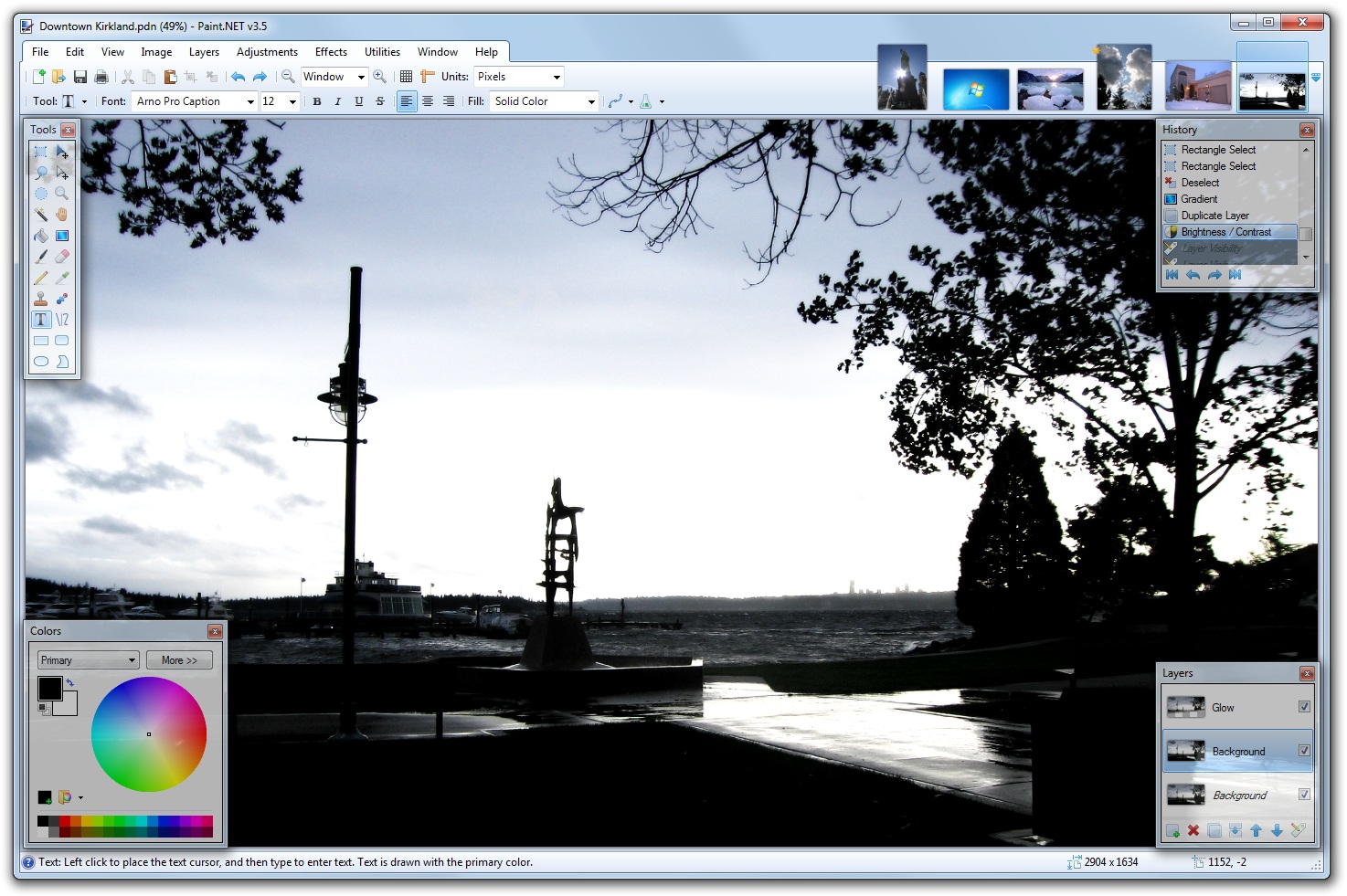
  • New: Refreshed user interface with new icons and visual styling. On Windows 7 and Vista, it is enhanced for Aero and “glass”.
  • New effect: Blurs -> Surface Blur, by Ed Harvey
  • New effect: Distort -> Dents, by Ed Harvey
  • New effect: Distort -> Crystalize, by Ed Harvey
  • New: Russian translation.
  • Performance and memory usage have been extensively optimized throughout the entire program.
  • .NET Framework 3.5 SP1 is now required, which has many built-in performance improvements.
  • Disk space usage has been reduced by about 12MB by using NTFS compression on installation files related to staging (.MSI) and diagnostics (.PDB).
  • Compression for .PDN images has been improved.
  • Effect dialog responsiveness has been improved.
  • Images open much faster, especially on single CPU systems.
  • Startup performance on most systems will be better by about 20%.
  • Memory usage has been reduced when more than one image is open.
  • Rendering quality has been greatly improved when zoomed in.
  • The selection outline is no longer animated. Instead of “dancing ants”, a context-sensitive “XOR” stipple pattern is drawn. This has allowed for improved performance and lowered CPU consumption (and longer battery life).
  • The font manager for the Text tool has been completely rewritten, which fixes many problems seen with crashes and missing fonts.
  • On Windows XP, the Text tool has improved reliability and font selection (it uses GDI instead of GDI+).
  • On Windows 7, the Text tool will use DirectWrite (instead of GDI) which gives better performance and greatly improved quality. On Windows Vista, you may install the Platform Update for Windows Vista to enable this feature; otherwise GDI will be used.
  • The toolbar font list has improved usability, rendering quality, and significantly improved performance.
  • The toolbar font list no longer requires an application restart to recognize newly installed fonts.
  • When many fonts are installed, both memory usage and startup performance have been greatly improved.
  • It is now drastically easier to move a very small selection.
  • All installation prerequisites are now installed automatically, such as .NET and Windows Installer.
  • Updates are now downloaded in the background, and installed after you exit the application. In previous versions, this was a foreground task and you could not use Paint.NET while the update was downloaded.
  • Added a “Utilities” menu. Updates, Languages, and Plugin Errors have been moved there.
  • Added a “Manage Fonts” command to the Utilities menu. This will launch the built-in Windows font control panel.
  • Clicking the middle mouse button on an image thumbnail will now close the image.
  • Improved the Unfocus effect.
  • The DirectDraw Surface (.DDS) file type now allows you to select the resampling algorithm for auto-generated mip-maps.
  • A processor that supports SSE is now required (almost all CPUs purchased this decade satisfy this).
  • Fixed an issue with Gaussian Blur and its treatment of alpha values.
  • Fixed a crash with the “Units” selector in the toolbar.
  • Fixed a crash due to an overflow that prevented very large images from working (64-bit only).
  • Fixed many other miscellaneous glitches and crashes.
  • The Korean translation has been removed. Sadly, we were unable to find the resources to complete this.

Enjoy! 🙂

Paint.NET v3.5 Beta 4 (Build 3591) is now available

The translations are done, the last bugs have been ironed out, and Paint.NET v3.5 is a few steps away from prime time. Officially this is a beta, but the final release is imminent.

Update: Looks like I mixed up the Russian translation, and it comes up in English. That will be fixed of course! 🙂

Anyway you can grab it over at the website. If you want the list of changes since Beta 3, you can get those at the forum. Happy Halloween!

Paint.NET v3.5 Beta 3 (Build 3572) is now available

This update is focused on fixing a lot of small issues, ranging from performance to selection clipping. The full changelist, as usual, is over at the forum. Of note, the compression for .PDN files has been improved. For the tech-minded, I switched from the .NET-supplied GZipStream over to SharpZipLib’s GZipInputStream and GZipOutputStream.

At this point, the bar for fixing a bug is quite high. I’m waiting for a few translations to be finalized, but other than that the only bugs I plan to fix are for crashes and data loss.

If you’re seeing a bug that still hasn’t been fixed, and you haven’t reported it, then you should report it. Please don’t assume everyone or anyone else will see it too. I once had someone, after the v2.1 release, post on the forum that some bug still wasn’t fixed after the betas. I asked him if he’d ever reported it. “No, I just assumed you already knew about it.” Well, I didn’t – it was an obscure issue where some ATI multimonitor utility would get confused and force all of Paint.NET’s tool windows to be the wrong sizes. (The fix was actually to delete the ATI utility – honestly, they aren’t necessary after Windows 98 anyway.)

Paint.NET v3.5 Beta 2 (Build 3561) is now available

This update fixes a whole swath of small issues, and even a few larger ones. The full change list is at the forum. As usual, you can either download it over at the forum, or use the built-in updater.

For those new to Paint.NET v3.5 with Beta 1, this is your first chance to try out the new background updater – you can have it download the update without sitting around and waiting for it as a foreground task!

Of note, there’s a new option in the Window menu called “Glass Dialog Buttons.” I really like the glass footers for dialogs and don’t want to give them up, but just enough people have expressed a strong dislike that I decided to make it an option.

Paint.NET v3.5 Beta 1 (Build 3550) is now available!

It’s finally time for the beta, which means things are mostly done and stabilization is now the highest priority.

Go download it at the forum, or get it via the built-in updater from any Paint.NET version. Make sure “Also check for pre-release versions” is enabled – you can ensure this by first clicking Check for Updates (from the Help or Utilities menus), then clicking the Options button.

This beta is the first to include the newly refreshed user interface, with new icons and enhancements for Aero and “glass” (Windows 7 and Vista only). Here’s a taste of that:

(Click for full-size version.)

You can get the full changelist over at the forum.

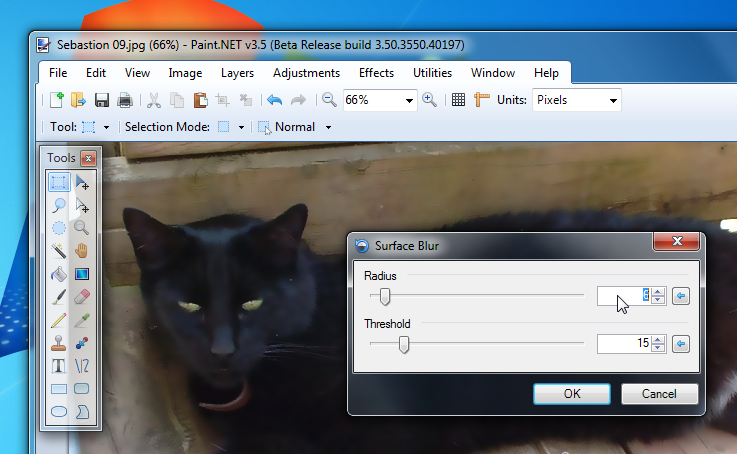
In addition to the glass in the image thumbnail list, I have added it to the footer of many dialogs. This includes the setup wizard, and dialogs for File->New, Image->Resize, Image->Canvas Size, Choose Tool Defaults, Save Configuration, Layer Properties, Rotate/Zoom, all IndirectUI-based effects (both built-in and plugins), and Help->About.

Here’s a little preview of that:

(Click for full-size image.)

Please note that if you are using the “Windows Classic” theme, or if you are running Windows XP, then Paint.NET v3.5 will look mostly the same as Paint.NET v3.36.

Also, there are some languages for which the “glass footers” will not be enabled. These include Japanese, Chinese, and Korean. The reason for this is purely technical – the text for the buttons does not render correctly. It appears that GDI+ is actually passing through to GDI when rendering those glyphs, and that causes the alpha channel to be overwritten and the text is illegible.

Paint.NET v3.5 now enhanced for Windows 7 with DirectWrite

The latest alpha build of Paint.NET v3.5 will now use DirectWrite instead of GDI for the Text tool if you are running Windows 7. Get it while it’s hot: http://paintdotnet.forumer.com/viewtopic.php?f=46&t=31132

DirectWrite is a new font and text rendering system that comes with Windows 7. In Paint.NET, you’ll see the following benefits:

  • Faster text rendering. This is currently due to important architectural differences from GDI. With DirectWrite, I can render using multiple threads (performance scaling), while also not blocking the UI thread from drawing (mutexing). GDI can only render text on 1 thread at a time, and that also includes the thread responsible for the UI. DirectWrite can also benefit from GPU acceleration when things are set up correctly with Direct2D (Paint.NET only uses the software rasterization capabilities right now, but in the future who knows!).
  • Better quality text rendering. DirectWrite implements what is called “y-direction antialiasing”. The short story is that GDI apparently only does antialiasing on the horizontal axis. It can also position characters with sub-pixel accuracy … in other words, GDI uses integers and DirectWrite uses floating point.

When it comes to performance you can see the difference just by opening Paint.NET, switching to the Text tool, and clicking on the font list dropdown. In GDI you’ll see the font previews slowly trickle into view, and scrolling can get laggy and “stalled” (the difference is very pronounced if you have lots of fonts installed – I have over 2000 on my system). With DirectWrite it’s nearly instantaneous and also very zippy when scrolling. If you type many lines of text onto the canvas, Paint.NET will use up to 1 thread per line for rendering (capped by the number of cores your CPU has), and on a dual- or quad-core system the performance benefit can add up. Systems with more cores/threads/CPUs will see the most benefit for both scenarios (yes, HyperThreading helps).

I tested on a 3.6GHz Core i7 and a 1.6GHz Atom. On both systems, DirectWrite was a big performance improvement.

Also, you can turn off DirectWrite in Paint.NET by launching the program with the /disableDirectWrite command-line parameter. This is quite useful for comparing the two renderers. If you don’t know what a “command-line parameter” is, then don’t worry about it 🙂

Thanks go out to Dwanye Robinson (at Microsoft) for helping out.

Paint.NET v3.36 is now available!

This is mostly a servicing release to make some small improvements and to fix a few important bugs.

You can get it via the built-in updater by going to Help -> Check for Updates, or by going to the website: http://www.getpaint.net/

Enjoy!

List of changes:

  • Improved: Effect rendering should be a little faster now.
  • Changed: Implemented some changes to the "Add Noise" effect that were suggested by a forum member.
  • Changed: The canvas background color is now always #c0c0c0.
  • Changed: The auto-updater should now correctly detect .NET 3.5 and newer, which will help to save bandwidth when Paint.NET v4.0 is released (it will require .NET 3.5).
  • Fixed: Paint.NET now works on a system that has the .NET 3.5 SP1 "Client Profile" installed.
  • Fixed: When zoomed in and the cursor is to the top-left of the image (negative coordinates), the ruler is now highlighted in the correct area. Fixed: The effect rendering system no longer sets the "Tag" property on the configuration dialog.
  • Fixed: Some incorrectly authored plugins would cause a crash when loading their support details (author, copyright, etc.).
  • Fixed: There was a bug in the color wheel for IndirectUI that caused it to show the wrong values at initialization.
  • Fixed: There was a performance problem for effects that used the IndirectUI color wheel control.
  • Fixed: In some rare cases, Paint.NET would crash while shutting down.
  • Fixed: When using the "Fixed Ratio" feature of the Rectangle Selection tool, it would crash if 0 was specified for both the width and height.

The Second Paint.NET v4 Screenshot

Like I said before, the first concrete work I’m doing for Paint.NET v4 is focused on the installer and updater. A lot of people have told me that they use Paint.NET infrequently, or that when they start it up they "just want to get something done really quickly." Updates really get in the way of that, and people are starting to get used to Firefox’s ability to install an update after you’ve finished your current session. As a result, many people are still sitting on old versions of Paint.NET. Bummer 😦

Paint.NET v4 will support this:

I’m choosing to not have a "cancel" or "do not install" button in order to better encourage (trick?) people into installing the update. However, it’s still possible to skip out on installing the update … just click the ‘X’ in the top right corner.

The wording and graphics are still first draft. I’ll probably want a separate button icon for each of them.

Unfortunately this all won’t be available until v4 ships … which means that a v3.xx -> v4 upgrade, which requires the installation of .NET 3.5 SP1 in many cases, cannot benefit from the more casual "install once I exit" option.

On another note, the "Optimizing performance for your system…" portion of installing, which uses ‘ngen.exe’ to precompile Paint.NET, is much faster now with .NET 3.5 SP1. I’ve also made the installer report real progress on this operation instead of using the "marquee" or "indefinite" mode.

Another thing I’m doing is implementing features in an order such that I could potentially ship a Paint.NET v3.50 from this codebase if I decided it was necessary. It might be a good idea to get .NET 3.5 SP1 installed on everyone’s systems sooner rather than later!

Paint.NET v4 takes a new, good turn (ixnay on the rewrite)

In my last post about Paint.NET v4, I said that I was going to be writing it "from scratch" — that it would be a rewrite from the ground up, in other words. I’ve since changed my mind.

You see, I got a few months into this rewrite project. I wrote a lot of code — 26,000 lines of it, in fact. However, the continually daunting task of finishing the next 150,000 lines of code and doing a reset on the 4 years of bug fixes in v3.xx made things … depressing. So, I’ve decided that I will turn back to the v3.xx codebase and work towards v4 from there.

However, don’t worry. The rewrite project, which is now called a "prototype," was not wasted time. I was able to work on and experiment with a lot of stuff in a nicely isolated fashion, and I now have a much better idea how I can refactor these into the existing [v3.xx] codebase. This includes some things for stuff like task management, extensibility, eventing, asynchronous programming, retained mode rendering, and an improved document model. This is actually a good example of quantity beating quality: by being able to iterate on all this enormous amount of code in isolation without the burden of the existing code base, I’ve been able to fine-tune it towards perfection.

In fact, I can’t stress that one word enough: depressing. Having 150,000 lines of code worth of work to do before you can even have something that’s feature parity with your already-shipping product, and that your users will even be interested in, is not fun. Next time you hear yourself thinking, "Rewriting this would be worth it," stop and switch over to thinking about prototyping in an isolated codebase instead of rewriting the existing codebase. I can write a lot of code really fast, and I like to think I’m very good at it, but this was just too much for me. Your code (and mine) may not be academic-proof or astronaut-quality, but that’s ok … because it already works.

Now, why don’t I talk some about version 4 itself and what’s happening.

The first features that I’ve been working on are focused on the installer and the updater. First, the installer will internalize the progress bar stuff — it will no longer have those annoying "child windows" for when it is installing things. For the update process, I am going to give a nod to Firefox and how it lets you install the update once the current session is complete. This is in response to a lot of feedback I’ve been getting from people who never install updates because they just want to get something done right now, and can’t be bothered to wait a few minutes for the update. It’s completely understandable — I do it myself. Changes to the installation and update code are always risky business, and as such I had been delaying these until I had a long, full test pass available (in other words, a major version update). And, to explain why they are risky business: if the installer or updater fails, then the user can’t use the product. Statistically speaking, they have disappeared from your userbase. They are gone. If your installer and updater work, then your Priority 0 feature is always making sure that it continues to work!

Oh, also, the installer will do a much better job of getting the .NET Framework installed if it isn’t there already. I’m taking advantage of the new Client Profile that’s available with .NET 3.5 SP1, and it rocks: it’s only about 300KB to include the bootstrapper!

This change of direction shouldn’t result in any lost or cut features. If anything it will dramatically shorten my schedule for v4. This is good news.

And in other news, expect a version 3.36 update once the Olympics are done. It will be a servicing release to fix some bugs, like the canvas background color one. I’ve settle on #c0c0c0, which is what Photoshop uses.